Instant Access
Sign in from any browser on desktop, tablet, or mobile and reach the full 10,000+ game catalogue without delays.
Login at SlotMafia in Australia: Quick Account Access
Access your AUD account, live dealer tables, and pokie library in seconds — from any browser or the SlotMafia iOS app.
Keep Your Account Safe
What You Should Do
What You Should Avoid
Your Login, Your Way
Instant Access
Sign in from any browser on desktop, tablet, or mobile and reach the full 10,000+ game catalogue without delays.
Secure Session
256-bit TLS encryption protects every login. Two-factor authentication is available for an added layer of account security.
iOS App Login
The SlotMafia iOS app supports Face ID and Touch ID login, letting you authenticate with a single biometric check.
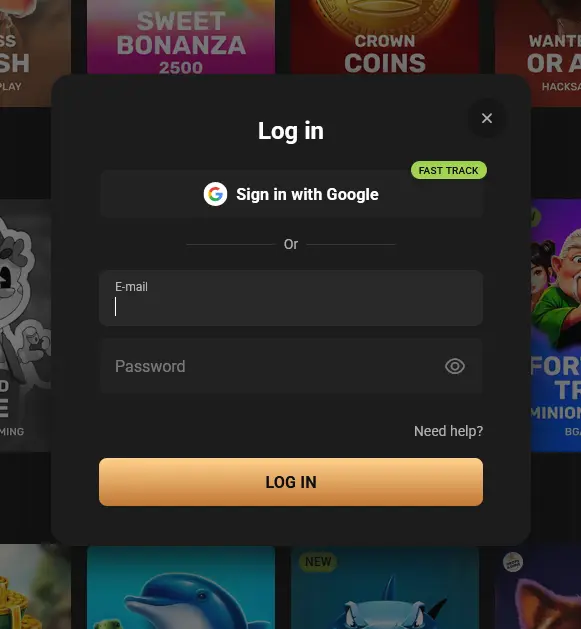
SlotMafia supports email-and-password authentication for all account types on every supported platform. Players who download the iOS app can additionally authenticate using Face ID or Touch ID, removing the need to type credentials at each session start. There is no social login or third-party sign-in; your SlotMafia account credentials are specific to the casino and protected by 256-bit TLS encryption on every request.
Signing in to SlotMafia is the same core process regardless of the device you are on, with minor differences in where the sign-in button sits.
Open slotmafia24.com in any modern desktop browser and locate the sign-in button in the upper-right corner of the navigation bar. Enter the email address and password linked to your account, then press the login button. The casino will load your AUD wallet balance and game lobby immediately. If you have two-factor authentication enabled, you will be prompted to enter the one-time code at this point before the session opens.
The SlotMafia website adapts to a single-column mobile layout on any smartphone browser. Tap the menu icon or the sign-in button at the top of the screen, enter your email and password into the touch-optimised form, and confirm. The full game catalogue, cashier, live dealer lobby, and promotions section load immediately without any plugin or additional software. Android players will use the mobile browser as the primary route since there is no Android native app at this time.
Players with the SlotMafia iOS app installed can open it and sign in with their registered email and password on the first launch. Afterwards, Face ID or Touch ID can be activated in the app settings, allowing a single biometric check to open the session on subsequent logins. The wallet balance, active bonuses, and complete game library all sync from the same account used on the desktop and browser versions.
Several issues can prevent a successful sign-in. The most common cause is an incorrect password, particularly if credentials were saved in a browser that has since been cleared. Use the password-reset link on the sign-in page: enter your registered email address and a reset link will arrive within a few minutes. Check your spam folder if it does not appear in your inbox promptly.
If you receive an account-locked message, this typically follows a number of failed sign-in attempts. Contact the support team via live chat at any hour — agents are available 24/7 across AEST and AEDT time zones and can restore access after confirming your identity. Players who have self-excluded or requested a cooling-off period will not be able to log back in until that period expires; support can confirm the status and the date it concludes. If the browser version of the site appears inaccessible, try the iOS app or a different browser before reaching out, as temporary caching issues occasionally affect one browser without affecting others.
SlotMafia applies 256-bit TLS encryption to every page and transaction, so login credentials and session data travel through an encrypted channel that is not readable by third parties. Two-factor authentication is available to all registered players and is strongly encouraged — once enabled, a one-time code is required alongside the password at each sign-in, meaning a stolen password alone is not enough to access the account.
Biometric authentication is supported within the iOS app, using the device’s built-in Face ID or Touch ID hardware to verify identity locally on the device before the session token is issued. The platform also applies automated account-activity monitoring that flags unusual login patterns — such as sign-ins from new geographic regions or devices — for additional review.
Players who notice any suspicious activity on their account should contact support at [email protected] without delay so that the team can review session logs and, if necessary, lock the account while the matter is investigated.
Registration at SlotMafia is open to players aged 18 and over. Creating an account takes only a few minutes on the website: provide your email address, choose a password, and complete the short registration form. Once your account is active you can make your first AUD deposit and activate the first stage of the four-part welcome bonus using promo code SM1. Identity documents — a passport or Australian driver’s licence alongside a utility bill or bank statement as proof of address — will be requested through the Verification section of your profile before your first withdrawal is processed.
Login Questions Answered
Select the 'Forgot password' link on the sign-in page, enter the email address registered to your account, and follow the reset link sent to your inbox within a few minutes.
Yes, the SlotMafia website is fully optimised for Safari and other iOS browsers, so you can sign in and access the complete game catalogue without downloading the iOS app.
Curacao Gaming Control Board licence OGL/2023/178/0101 requires Hollycorn N.V. to confirm your identity before processing withdrawals — upload a passport or Australian driver's licence and a recent utility bill or bank statement via the Verification section of your profile.
Ready to Play? Sign In Now
Claim up to $25,000 and 350 free spins across your first 4 deposits.
Join the Family Gambling can be addictive. Players must be 18 or over. Bonus terms and conditions apply.